WordPress 2.5+ Upload Image Error – Finally Fixed!
I know I’ve mentioned it before, but I’ve had some problems with WordPress 2.5 and their new image upload. Now I know there have been many, many, many, (well let’s just say a lot) of posts and articles about how to fix this problem. But, none of them seemed to work for me. Most of them just go into the basics: setting folders with the right permissions, etc.
My Set Up
I won’t go into detail, but I think being on Dreamhost has something to do with it, because trying all this on my local PC with XAMPP Lite on Windows XP.
Here’s What I Tried
In addition to trying all of the above on my existing blogs, I’ve tried the fresh install approach. I installed a fresh copy of WordPress and then bit by bit, I copied in database tables. All seemed to go fine, for a while, then (for some reason) I would just get that error again. It didn’t matter what the browswer was either. When I attempt to insert an image the screen would blank out.
Here’s The Problem
I noticed that the stuff would always break when I copied over the options table to my WordPress database. So after many, many hours and copying records (almost) one by one into the newly installed WordPress database, I’ve finally narrowed it down. The WordPress address (URL) needs to be all lowercase or else the thing just doesn’t work. I don’t really have an explanation for it and frankly, after all this time, I don’t really care; I’m just happy it finally works.
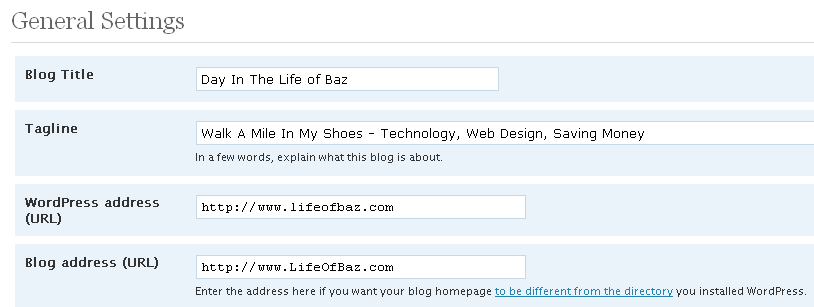
Now, I suppose that it’s my fault for wanting fancy looking URLs, so I take the blame.
Hope everyone else finds this helpful.