Reward Your Regular Readers – Skip The Ads
Now I know you’ve read about this and it’s usually a good idea: concentrate most of your ads on your older posts and hide ads from your regular visitors. I mean, they come here everyday, reward them with a little bit of clean content.
But also, if you’re like me, you’re lazy and haven’t gotten around to coding this yet. Well here you go, a WordPress plugin that I’ve stumbled upon: Who See’s Ads?.
First of all, you can display anything in these blocks: HTML, JavaScript, even PHP. The ad blocks are controlled by certain contexts. It’s a lil' bit like coding if you think about it. You still a bunch of if statements together to determine whether or not your content is displayed. These include:
- Regular visitors - Which you can define by those who’ve viewed your content a certain number of times within a certain period (eg. twice in 10 days).
- Coming from search engine - Self explanatory I hope.
- Posts older than a defined number of days
- Logged in visitors
- Between a particular date period
- If the ad was viewed a certain number of times - You could set and expiration duration
- And even custom PHP conditions - Here you can stick in WordPress functions such as in_category();
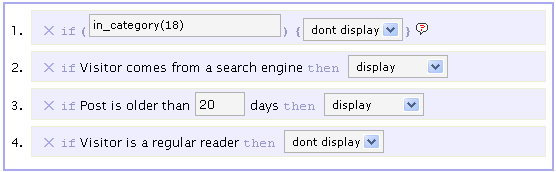 You can insert these contexts into your template with PHP calls or into your posts, with comments.
With Who Sees Ads? you can completely revamp your ad structure. I’ve even begun to experiment with it on here. There’s just one slight problem with WP-Cache, but you can’t have caching with dynamic content, can you?